One preferred website address. A clearer path for visitors and search engines.
Calico Canonical Redirects is a free WordPress plugin that helps bring HTTP, HTTPS, www, and non-www versions of your website to one preferred HTTPS address. It uses the Site Address already configured in WordPress and gives you a practical rollout process: preview the proposed results, test temporary redirects, then enable permanent redirects when everything checks out.
What problem does it solve?
A website can have several versions of the same address: http://example.com, http://www.example.com, https://example.com, and https://www.example.com. When those versions remain accessible without consistent redirects, visitors and search engines can reach the same content through different URLs.
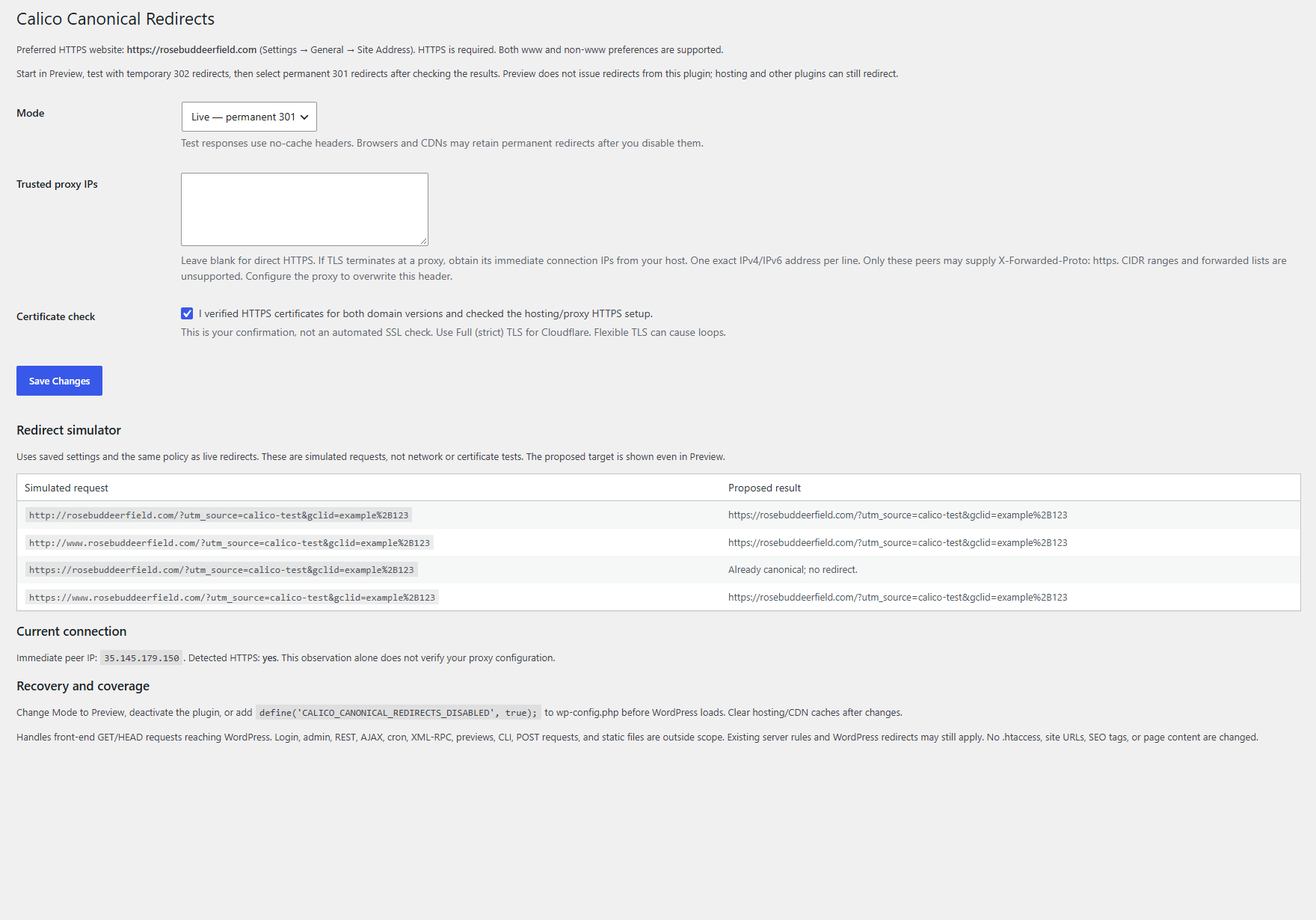
Calico Canonical Redirects handles this specific cleanup for front-end requests that reach WordPress. It supports either www or non-www as your preferred domain, requires HTTPS, and preserves paths and accepted tracking query strings. A visitor following an older domain variation can reach the corresponding page at your preferred address.
Why it is valuable
- A consistent destination: Bring supported domain and protocol variations to the HTTPS address your website uses.
- A staged setup: Inspect proposed results before enabling redirects, then test with temporary 302 responses before committing to permanent 301 responses.
- Tracking continuity: Preserve accepted query strings, including supported campaign parameters, while normalizing the domain and protocol.
- WordPress controls: Manage the plugin from Settings without manually editing server redirect rules.
- Built-in recovery: Return to Preview, deactivate the plugin, or use the documented emergency-disable constant.
How it helps with Google Search Console
If Search Console shows duplicate URLs caused by HTTP/HTTPS or www/non-www variations, consistent permanent redirects can help Google understand which version you prefer. Google describes redirects as a strong canonicalization signal. Keep internal links, sitemap URLs, and canonical tags aligned with that preferred address. Read Google’s canonicalization guidance.
The goal is to make the preferred destination clear, not to make every excluded URL disappear. An intentionally redirected variant may appear as Page with redirect; that can be correct. Alternate page with proper canonical tag can also be expected. Inspect the destination’s indexing status. Changes require recrawling, and Google ultimately chooses its canonical. The plugin does not guarantee indexing or rankings, fix unrelated coverage issues, or rewrite SEO canonical tags. See Google’s Page indexing report explanations.
How to install and use it
- Download and install. Download the plugin ZIP below. In WordPress, go to Plugins → Add Plugin → Upload Plugin, select the ZIP, install it, and activate it.
- Check your preferred address. Confirm that Settings → General → Site Address contains the HTTPS domain you intend to use. The plugin reads this setting; it does not change it.
- Start in Preview. Open Settings → Canonical Redirects. Preview shows proposed destinations without issuing redirects from this plugin. Hosting rules and other plugins may still redirect. The simulator is not a live network or certificate test.
- Verify HTTPS and hosting. Check that valid certificates cover both www and non-www. If your host terminates HTTPS at a proxy, ask it for the exact immediate proxy IPs and header configuration. Leave Trusted proxy IPs blank for direct HTTPS. For Cloudflare, use Full (strict). Confirm the certificate/setup checkbox only after checking the setup.
- Test temporary redirects. Select Test — temporary 302, save, and clear hosting/CDN caches. Test all four domain/protocol variants on a real page, including a path and tracking query. This mode affects visitors while enabled.
- Enable permanent redirects. Once the destinations are correct and there are no loops, select Live — permanent 301, save, and retest. Browsers and CDNs may retain permanent redirects after settings change.
- Review Search Console. Inspect the preferred HTTPS destination and monitor the reports as Google recrawls.
Coverage and recovery
This plugin supports single-site public domains on standard ports and front-end GET/HEAD requests that reach WordPress. It does not handle static files served directly by the server, form POST submissions, login/admin, REST, AJAX, cron, XML-RPC, CLI, or previews. Existing hosting, CDN, and WordPress rules can still apply. It does not edit .htaccess, site URLs, page content, or SEO tags, and it cannot repair SSL certificates.
To stop the plugin’s redirects, switch to Preview or deactivate it. Emergency recovery is available by adding define('CALICO_CANONICAL_REDIRECTS_DISABLED', true); to wp-config.php before WordPress loads. Clear hosting/CDN caches afterward; cached browser 301s and other redirect rules may persist.